intelligaia Request a demo
Sovereign AI, working every day

AI your organisation owns, from the models to every desk.

Yantra runs every AI model on your hardware or ours. Medha gives everyone an assistant grounded in your documents. Nirman is the desktop workspace for research, writing and code. Prebuilt connectors bring in WhatsApp, email, chat and files.

Yantra, Medha and Nirman in one platform. Screens show sample data.

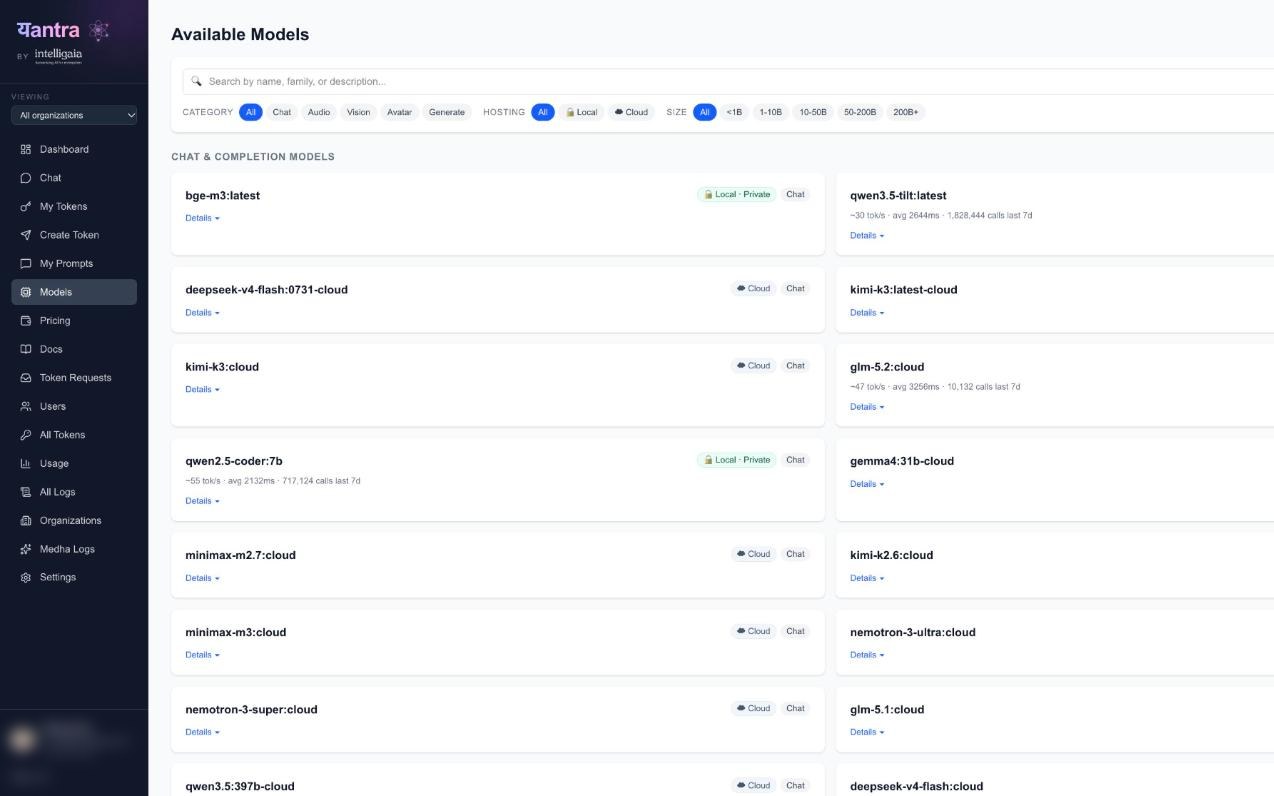
Yantra on a laptop: the model catalog with 44 chat, audio, vision, avatar and generation models, filterable by local or cloud hosting
Medha · assistant
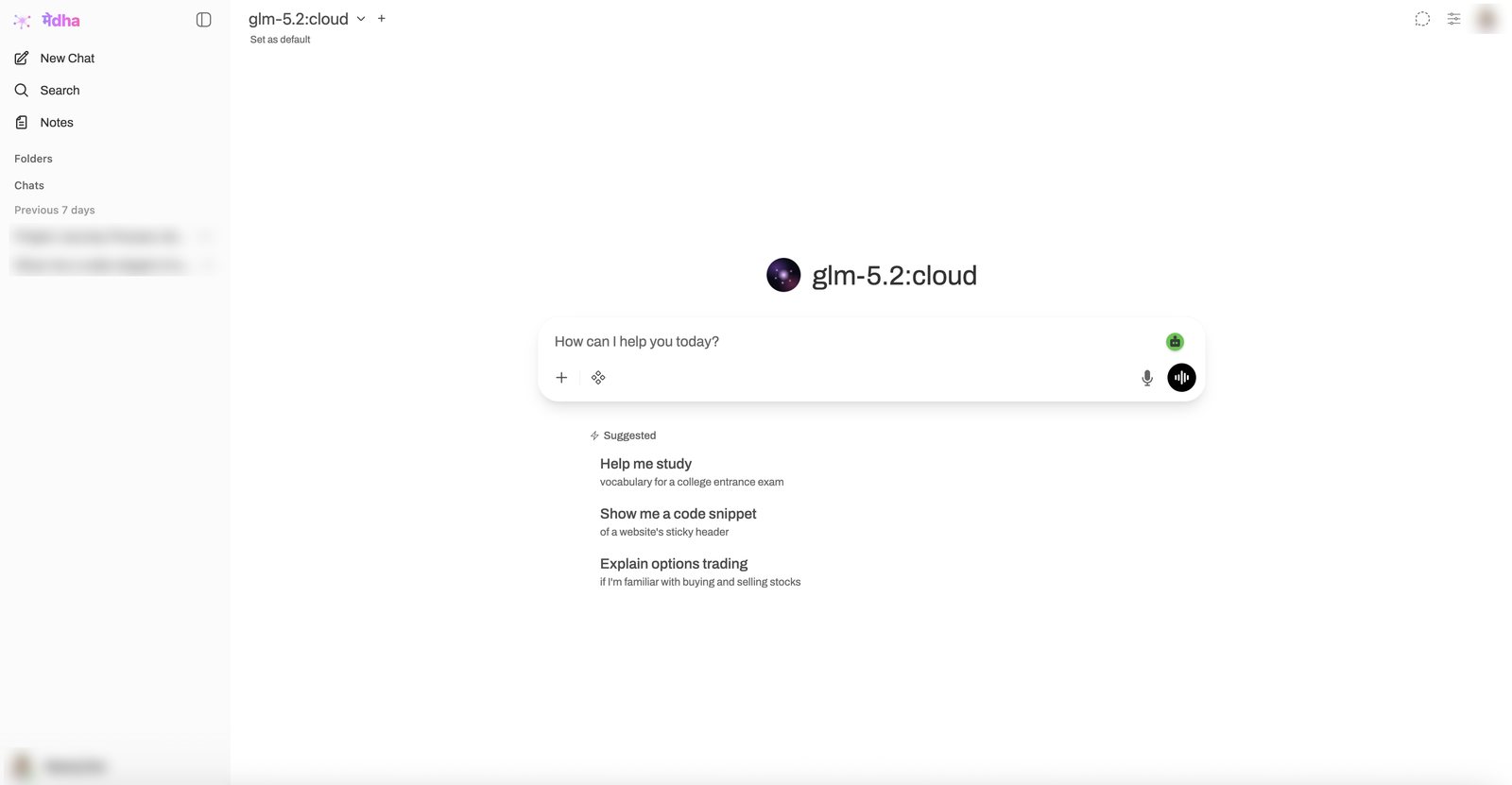
Medha on a tablet: model picker, prompt box and suggested prompts; past chats blurred
Nirman · workspace
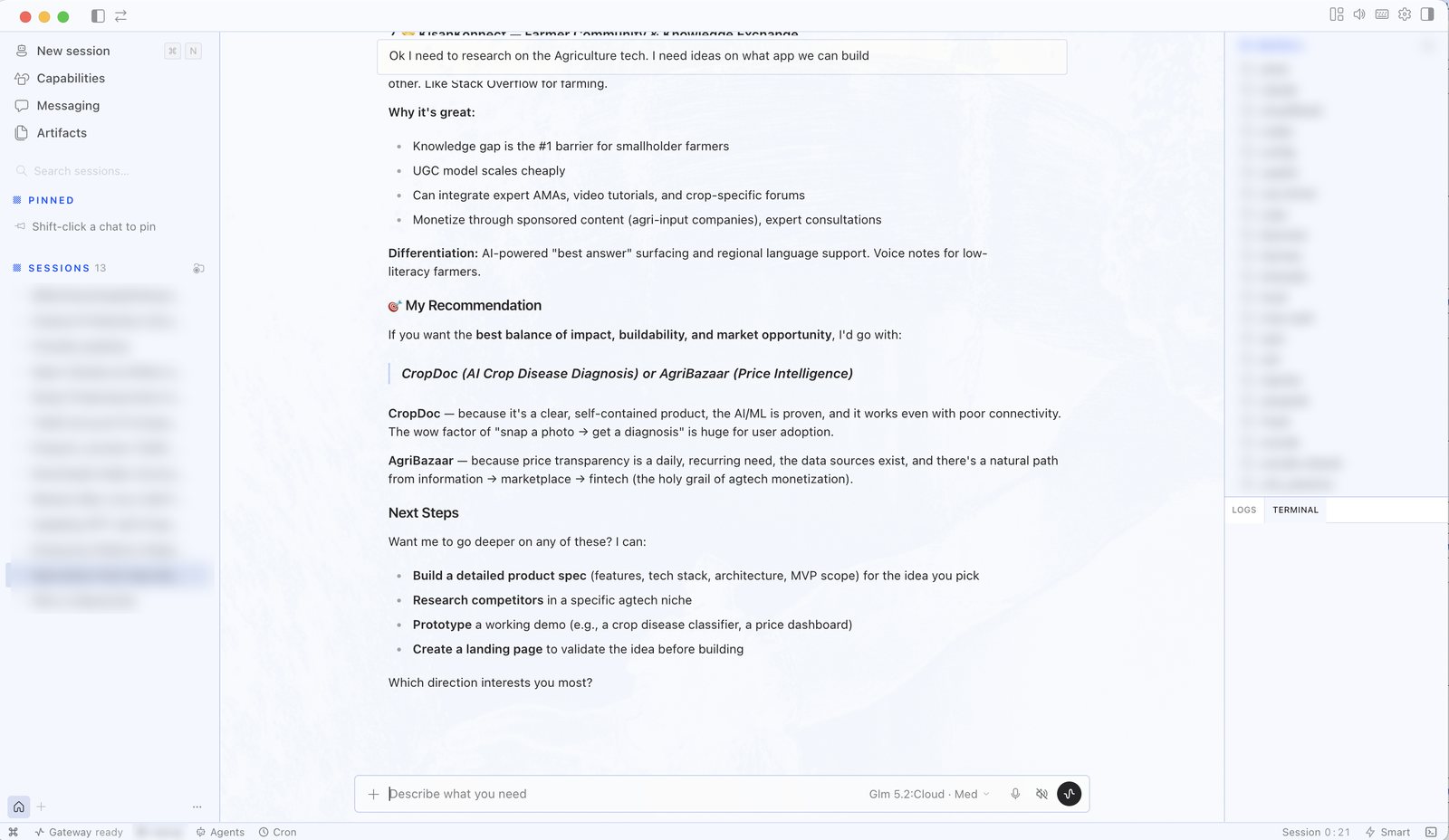
Nirman on a tablet answering a research request; side panels blurred
44models behind one key
7model families, one gateway
8prebuilt connectors
3ways to deploy
The Yantra suite

One platform, three products.

Yantra runs the models. Medha and Nirman are what people use every day on top of it, with the same models, permissions and audit trail everywhere.

Ya01 · Platform

Yantra. The foundation of your AI ecosystem.

One console to run AI for the whole organisation: every model, every request, every cost.

  • OpenAI, Anthropic and Ollama compatible. Swap the base URL and existing apps work
  • Live health of every model family, with automatic failover
  • Google SSO, roles, token approval and rate limits
  • Every request logged and costed
How the platform works →
Yantra · Dashboard
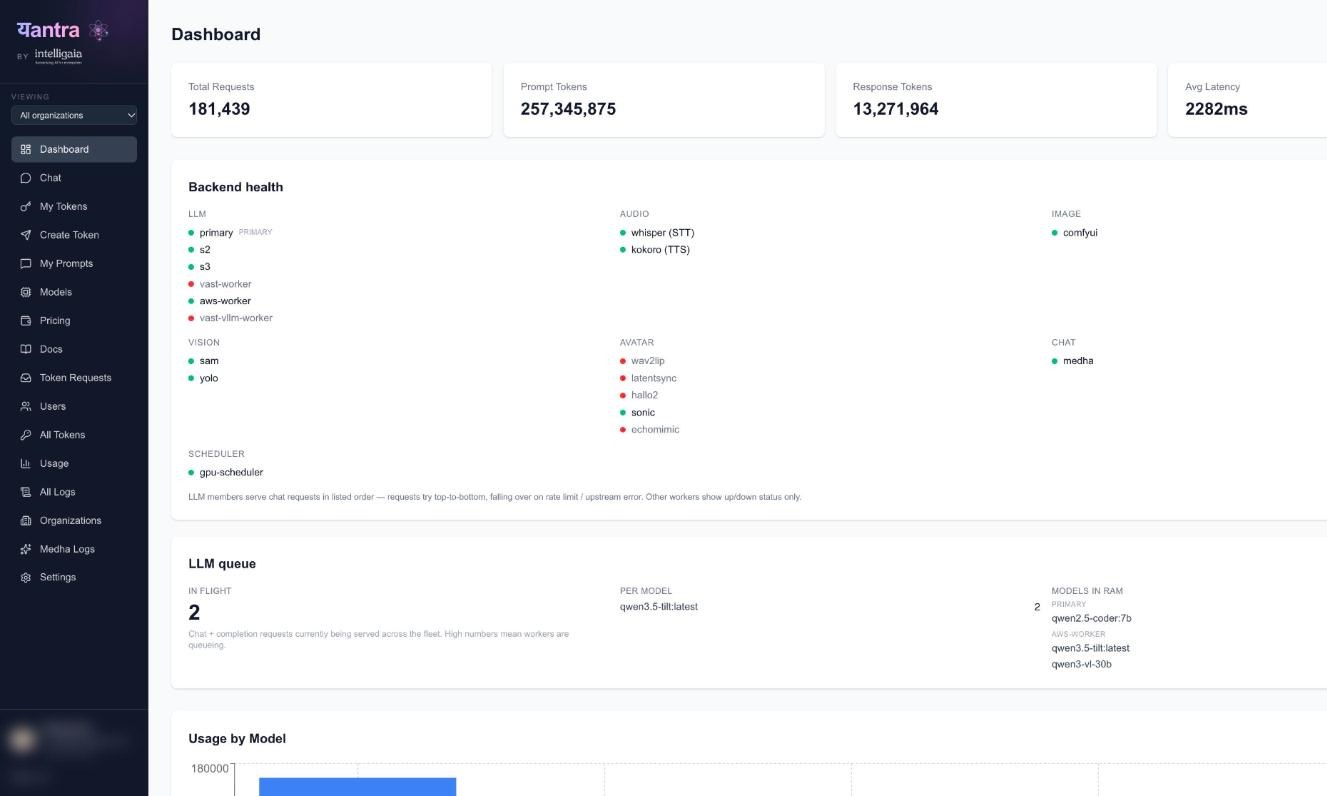
Yantra dashboard with its navigation: requests, tokens, latency and the live health of every model worker
Me02 · Assistant

Medha. The everyday assistant, grounded in your documents.

Policies, manuals and project files: Medha answers from what your organisation has written, on models you control.

  1. Chats, folders and notesKept, searchable and filed. Blurred here.
  2. Model pickerPick the model per conversation, served by Yantra.
  3. Prompt, files and voiceAsk, attach documents, use tools, or talk.
  4. Suggested startsReady prompts to help people begin.
Medha · New chat
Medha start screen: past chats (blurred), model picker, prompt box with attach, tools and voice, and suggested prompts1234
Ni03 · Workspace

Nirman. An AI workspace on the desktop.

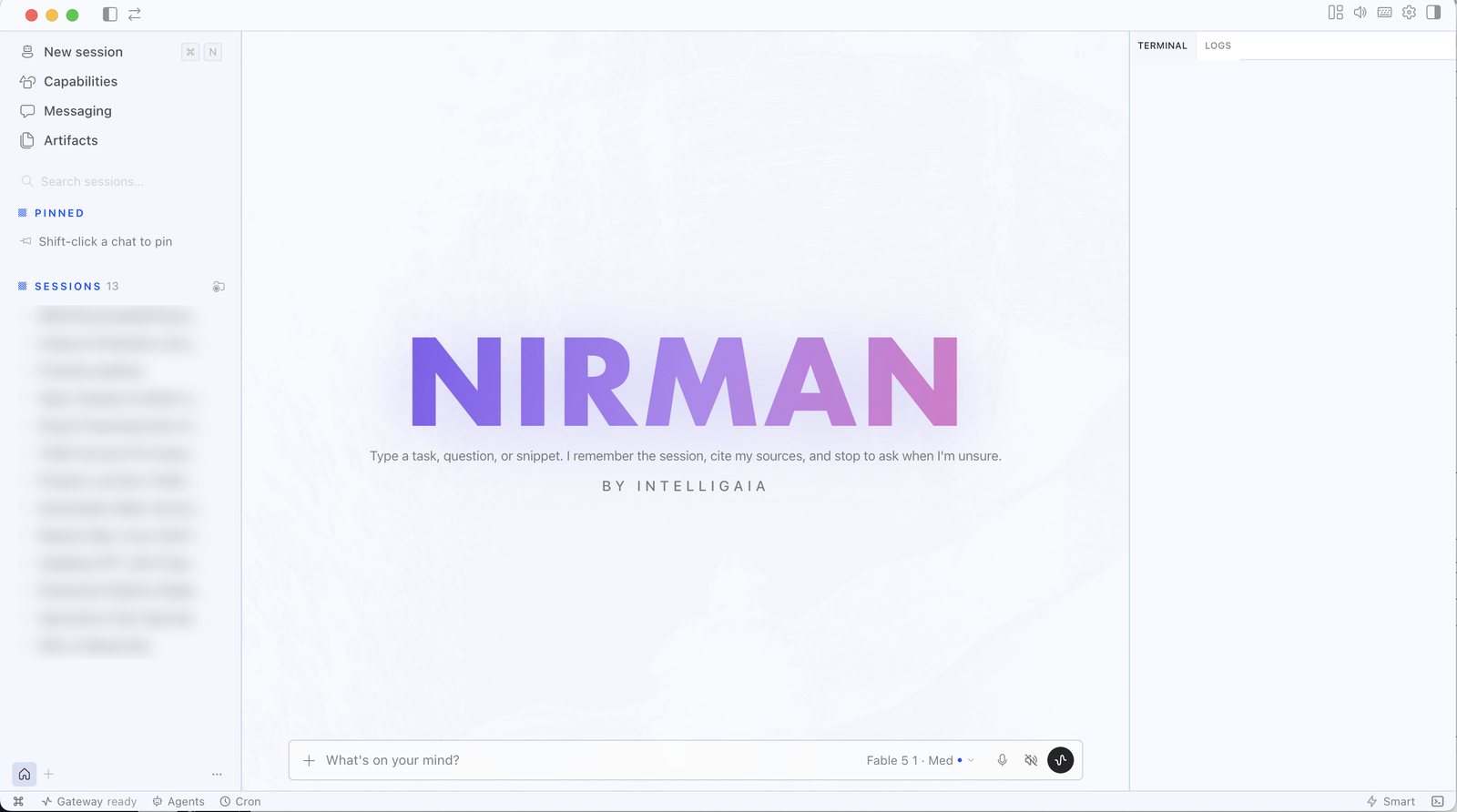
Give it a task, a question or a snippet. It remembers the session, cites its sources and stops to ask when it is not sure.

  • Research, writing and code in one place
  • Works with the files on your machine
  • Background agents and scheduled jobs
  • Model chosen per task, through Yantra
Take the tour →
Nirman · New session
Nirman start screen with past sessions (blurred) and a prompt box
Yantra · Dashboard
Yantra dashboard with its navigation: requests, tokens, latency and the live health of every model worker
Medha · New chat
Medha start screen: past chats (blurred), model picker, prompt box with attach, tools and voice, and suggested prompts1234
Nirman · New session
Nirman start screen with past sessions (blurred) and a prompt box
Yantra
The capabilities

A full studio of AI, one keycard.

Seven families of open research models, each reachable with the same token. No separate vendors, no data leaving the building.

ChLLM

Chat & code

Reasoning, writing, structured output, agentic tool use.

qwen3.6gemma4gpt-oss
SpTTS

Text → speech

Natural voice from text in under a second.

kokoro
TrSTT

Speech → text

Transcripts with word timings and subtitles.

whisper
ImImage

Text → image

From rapid drafts to photoreal finals.

flux-devsdxl
VdVideo

Text → video

Short cinematic clips from a prompt.

ltxwan2.2
AvAvatar

Talking head

Photo and audio become a lip-synced presenter.

sonic
ViVision

See & segment

Click-to-mask segmentation and detection.

sam2.1yolo11
MeHelper

Ask Medha

A built-in assistant grounded on your documents.

in-app
One platform, top to bottom

Everything an organisation needs to run AI, in one layer.

Yantra sits between the tools your teams build and the compute you own. It routes every request, enforces who can do what, and keeps a complete record.

from openai import OpenAI

client = OpenAI(
  base_url="https://yantra.your-org/v1",
  api_key=YANTRA_KEY,
)
client.chat.completions.create(
  model="qwen3.6",
  messages=[{"role": "user", "content": "…"}],
)

The only change is the base URL. Anthropic and Ollama clients work the same way.

  • The same platform managed by us or white-labelled on your hardware
  • Air-gap capable for government and regulated work
  • Already in production for startups and enterprises
Yantra consoleLiveSample data
Requests today48,213▲ live
Avg latency812 ms
Workers healthy18 / 18All families serving
LLM
  • llm-1 · primary
  • llm-2
  • llm-3
Speech
  • whisper · STT
  • kokoro · TTS
Image
  • flux-dev
  • sdxl
Video
  • ltx
  • wan2.2
Avatar
  • sonic
  • latentsync
Vision
  • sam2.1
  • yolo11
Chat
  • medha
Scheduler
  • gpu-scheduler

All workers healthy. Requests are spread across the fleet.

Built on Yantra · Nirman

Inside Nirman: what each part of the screen does.

One workspace for research, writing and code. Every session is kept, so work builds on itself instead of starting over.

Nirman · Research session
Nirman working on a research request, with sessions, tools, model picker, files, terminal and status bar
1Sessions1 / 8

Every conversation is kept, searchable and pinnable, so work picks up where it left off. Blurred here.

  1. SessionsEvery conversation is kept, searchable and pinnable, so work picks up where it left off. Blurred here.
  2. Capabilities, messaging, artifactsThe tools Nirman can use, the channels it talks on, and the documents it makes.
  3. The answerStructured, with the reasoning and a recommendation, and it asks what you want to do next.
  4. Prompt and voiceType or speak a task. Attach files with the plus.
  5. Model pickerChoose the model and effort for each task, served through Yantra.
  6. FilesThe working folder it can read and write on your machine. Blurred here.
  7. Terminal and logsEvery command and step it runs, visible as it happens.
  8. Gateway, agents, schedulesConnected to Yantra, with background agents and scheduled jobs.
Prebuilt connectors

Works with the tools your teams already use.

Prebuilt connectors come with the platform. Anything else is built on demand.

Prebuilt
WhatsAppBusiness messaging and chats
Prebuilt
GmailMail and threads
Prebuilt
Google ChatSpaces and messages
Prebuilt
Google DriveFolders and files
Prebuilt
Google TasksTask lists
Prebuilt
SlackChannels and messages
Prebuilt
WebexSpaces and messages
Prebuilt
GitHubIssues and pull requests
Next
Microsoft 365Outlook, Teams, SharePoint
On demand
Custom connectorYour ERP, HR, finance or portal, built on request
Custom connectors · on demand

Don’t see your system? We’ll connect it.

ERP, HR, finance, CRM, a government portal or an internal database: we build the connector by API or MCP. Once it’s in, it works like the prebuilt ones, with the same sign-in, permissions and audit trail.

  1. Tell us the systemand what should flow in or out
  2. We build and test itagainst your data, read-only first
  3. It joins the listbeside the prebuilt connectors
Request a connector →
How Yantra powers connected apps

From connected channels to work that gets done.

Connect the channels where work already happens. Yantra reads them with your own models, governs every call, and a connected app turns it into action. Below is one we run every day for staffing and delivery.

Yantra connectors

The conversations come in

WhatsApp chats, Gmail senders, Slack channels and Drive folders, each linked to a project through the prebuilt connectors.

Yantra models

The models read and reason

Project health, risks, answers and staffing suggestions come from models served by Yantra on local GPUs, through its OpenAI-compatible API.

Yantra control plane

Every AI call governed

Google SSO, roles and rate limits, with each request logged and costed. The app did not have to build any of it.

Your connected app

The app does the work

Staffing, project health, actions from WhatsApp with YES and undo, and a full activity log.

Comes with YantraBuilt on top for your workflow

01Powered by Yantra connectors

Every channel, mapped to the right project

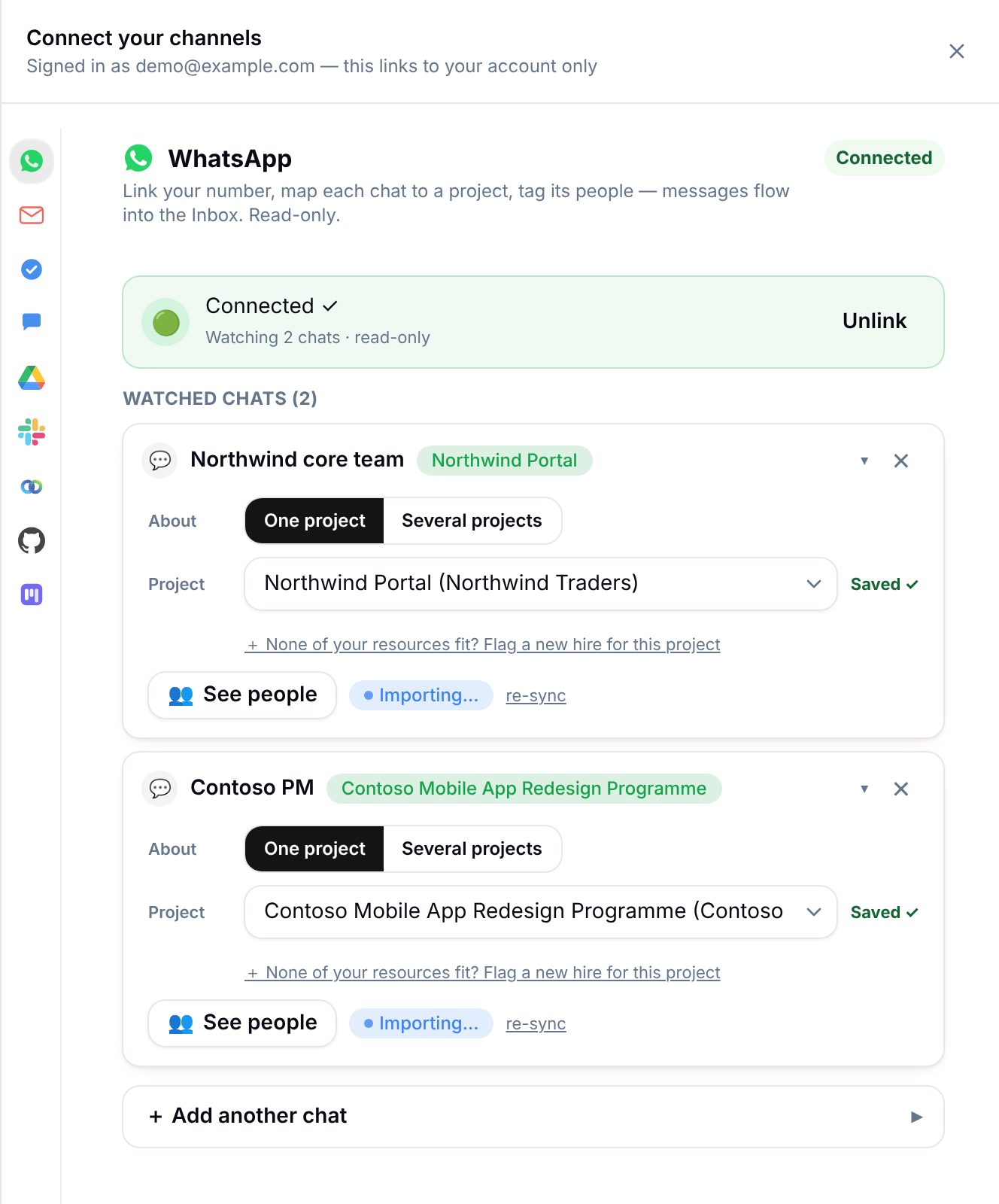
Link a WhatsApp chat, a Gmail sender, a Slack channel or a Drive folder to a project once. From then on every message lands in one picture per project. Read-only, and only the chats you choose.

  • Each person connects their own accounts
  • Private chats stay with their owner
  • The same prebuilt connectors listed above
Connected app · Channels
Connect your channels: a WhatsApp chat linked to a project, read-only
02Powered by Yantra models

Health read from the conversation, not a status field

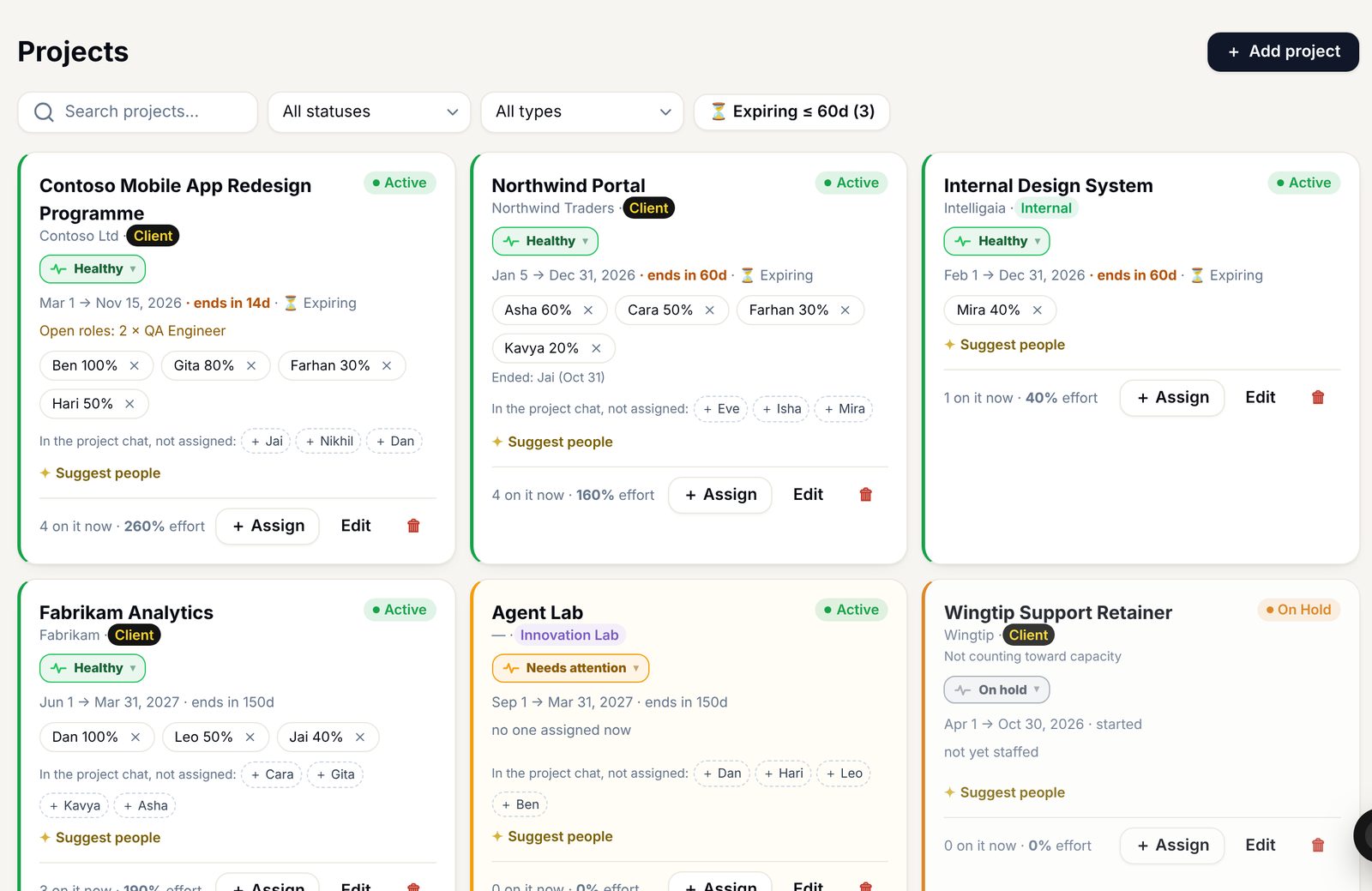
Yantra’s models read what clients and teams actually say, flag risk early, and turn it into one move: who to add, who frees up, which skill is missing. The reading happens on your own GPUs.

  • Health per project, updated as conversations happen
  • Risks flagged before a status meeting would catch them
  • Runs on local models through Yantra
Connected app · Projects
Projects with health meters, team allocations, open roles and suggested people
03Powered by Yantra models + control plane

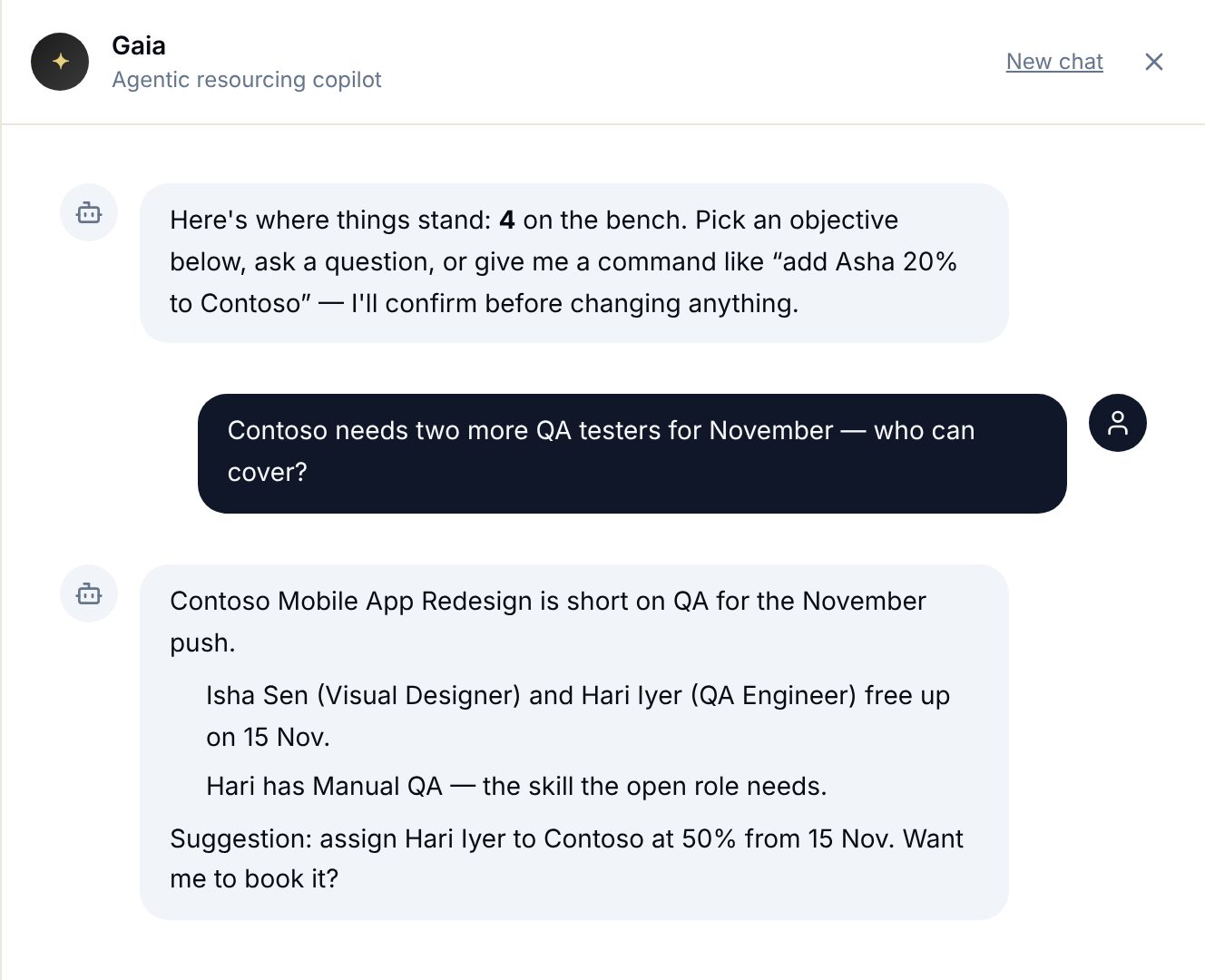
Ask in plain language. Act with approval.

A question like “who can cover QA next sprint?” gets an answer from live data, with the reason and a suggested booking. Nothing changes until a person says yes, and only people with the right role can say it.

  • Answers grounded in live data, with the reason shown
  • Every suggestion waits for a person
  • Roles and sign-in come from Yantra
Connected app · Ask
An assistant answering a QA capacity question with who frees up and a booking suggestion
04Powered by Yantra connectors + models

Works where people already talk

Managers ask and act from WhatsApp: who is free, book someone, move a project, approve a step. Several instructions in one message become one list and one yes. Every change can be undone and is reported to the right people.

  • Several instructions, one confirmation
  • Undo within ten minutes
  • The PM and management are told automatically
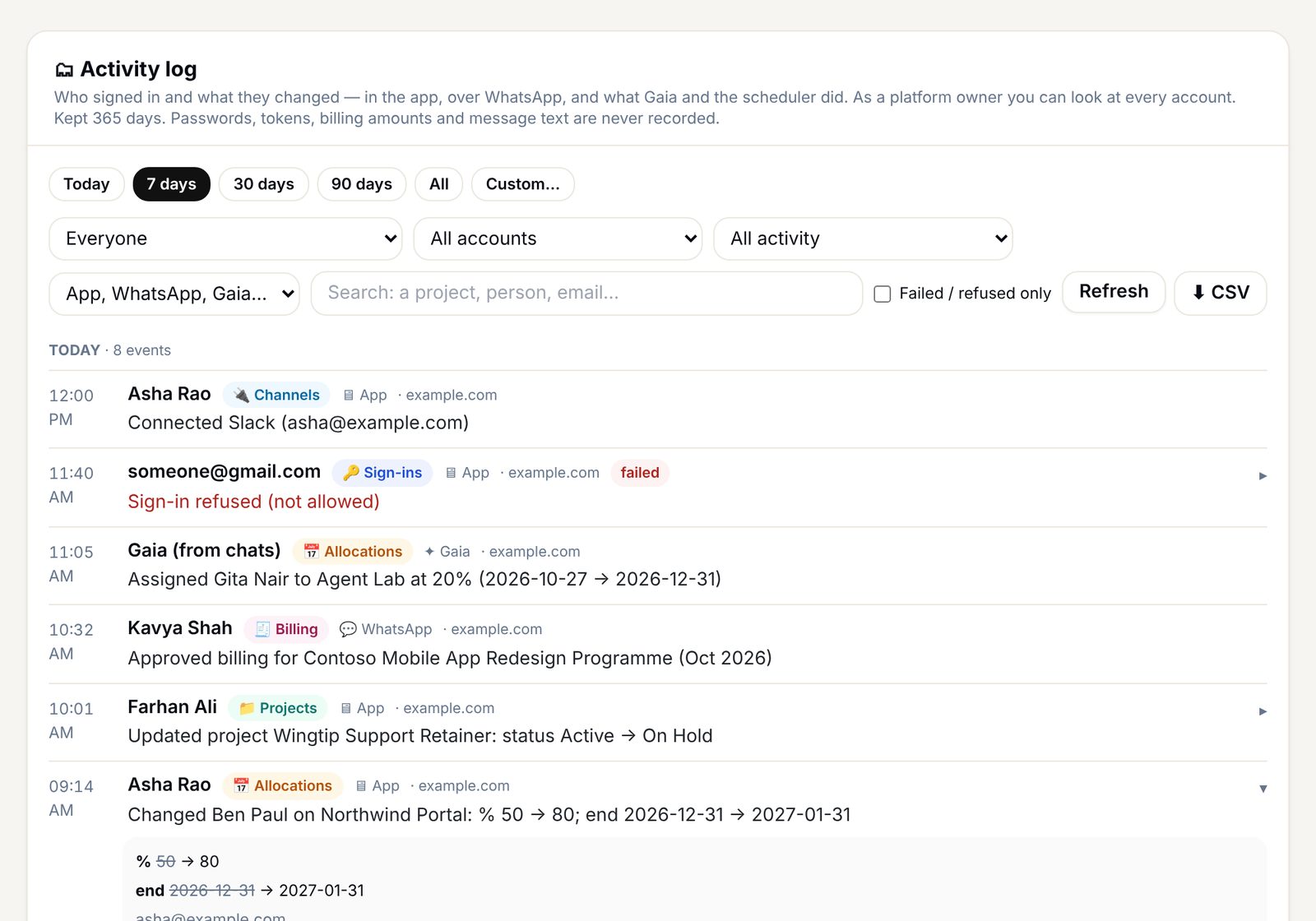
05Powered by Yantra control plane

Every action on the record

Who signed in and what changed, from the app, from WhatsApp or by the assistant itself, with before and after. Search by person, date or activity, and export it.

  • Sign-ins and every change, kept for a year
  • App, WhatsApp and assistant actions side by side
  • Export for audits
Connected app · Activity log
Activity log of sign-ins and changes by person, channel and date
06Powered by everything above

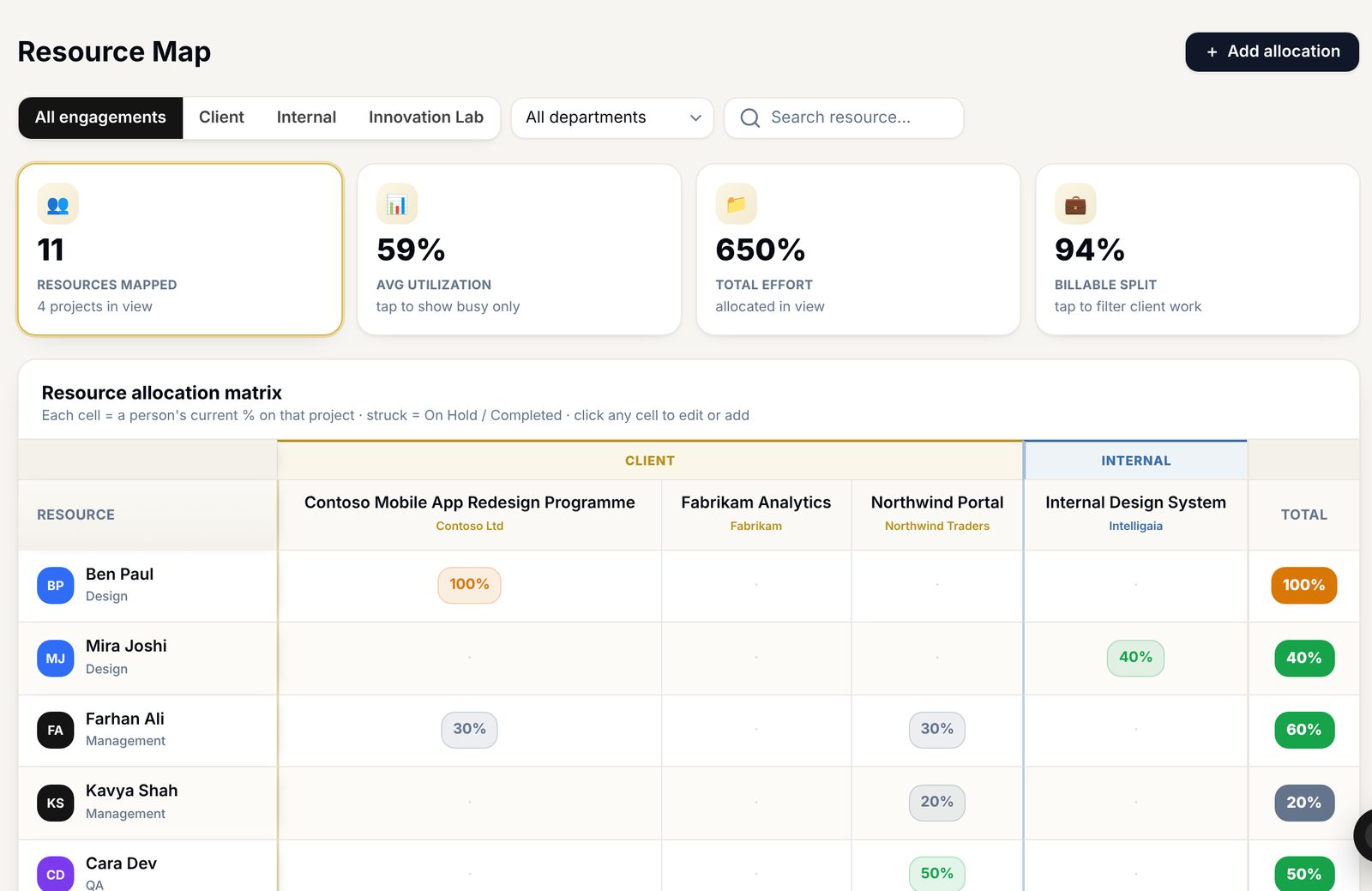
One picture of people and projects

Allocation, utilisation and the bench in one view, kept current by the channels, the models and the record above. Planning starts from what is true today.

  • Who works on what, at what percentage
  • Utilisation and billable split at a glance
  • Kept current without status meetings
Connected app · Resource map
Resource map: people against projects with allocation percentages, utilisation and billable split
8channels connected, read-only
37people planned
35projects kept current
100%of changes on the record

Built for your workflow. Connected apps sit on the prebuilt connectors and Yantra, and are scoped with you as their own engagement.

Discuss a connected app
Deployment models

Own as much of the stack as you want.

The same platform, delivered three ways, from fully managed to fully sovereign.

Managed

Cloud subscription

Intelligaia hosts and runs Yantra. Prepaid credits, spent per model.

  • Live in minutes, zero operations
  • All model families included
  • Rates 50–90% below commercial
Best for teams and fast pilots
Start a pilot
For governmentsSovereign

On-premise, white-labelled

The entire platform on your hardware, under your brand.

  • Data never leaves your walls
  • Your name, your domain
  • Air-gapped option
Best for governments and regulated organisations
Plan a deployment
Hybrid

Dedicated GPU fleet

Bring your own GPUs into Yantra as a private, pinned fleet.

  • Your hardware, our platform
  • Workloads pinned to your nodes
  • Managed operations optional
Best for organisations with existing GPUs
Talk to an engineer

Compute for a sovereign setup. A standard server runs the platform and applications. The AI needs GPU compute: NVIDIA DGX Spark units, two at minimum and four to five for a full team.

How we work with you

Platform, applications, and the people to fit them.

The Yantra suite

Yantra, Medha, Nirman and the prebuilt connectors, deployed the way you choose.

Connected apps, if you need them

Your processes turned into apps and agents on Yantra and the connectors, like the staffing app shown above. Scoped with you.

Engineers and training

Our engineers work inside your team to map processes, build and hand over, and train your people to run it.

Questions

What teams ask us first.

Does our data leave our network?

Not on a sovereign or hybrid deployment. Models run on your GPUs, and frontier cloud models are only used when you switch them on. Every request is logged, so you can show exactly where data went.

Do our existing applications need rewriting?

No. Yantra speaks the OpenAI, Anthropic and Ollama APIs. Point the client at your Yantra base URL and the application keeps working, now with access control, logging and cost accounting.

Can we still use frontier models?

Yes, as an opt-in burst. Organisations already on Google, Microsoft or Amazon can keep frontier models where they want them and run the same applications on top.

Can you connect a system that isn’t on the list?

Yes. Custom connectors are built on demand, by API or MCP, for systems such as ERP, HR, finance, CRM, government portals or internal databases. Once built, a custom connector works like the prebuilt ones: same sign-in, permissions and audit trail.

What hardware do we need?

For a sovereign setup, a standard server for the platform and applications, plus GPU compute for the models: two NVIDIA DGX Spark units at minimum, four to five to support a full team. The managed plan needs no hardware.

How fast can we start?

The managed plan is live in minutes. A sovereign rollout starts with one team and one application, connected to the channels you already use, then grows from there.

Are connected apps part of the Yantra plan?

They are built on top of it. A connected app uses the prebuilt connectors, Yantra’s models and its control plane for one workflow, like the staffing and delivery app shown above. Each one is scoped with you as its own engagement.

Who builds the applications specific to us?

Our engineers. They map your processes, build the applications and agents on Yantra, connect them to your systems, and train your team to run them.

Let's build your AI foundation

Bring the ecosystem in-house.

Tell us how you want to deploy, managed, on-premise or on your own fleet, and we'll tailor a rollout.

Good work starts with a conversation.

Tell us what you have in mind.
A few lines are all we need to get started.

What can we help with?

Just three things.

Your inquiry goes directly to our team.